

When Your Robot Vacuum Refuses to Start
You press the power button, but nothing happens. The LED stays dark, the brushes stay still, and your robot vacuum sits there like a useless plastic brick. This is one of the most frustrating moments for any smart home owner. A robot vacuum that won’t turn on can disrupt your cleaning routine and leave you wondering if you need to buy a replacement.
Before you give up, understand that many of these issues have simple fixes. The problem could be a drained battery, a faulty power switch, or a clogged sensor. With the right guidance, you can often get your robot back to work without spending money on a new machine. That is where a dedicated repair guide becomes invaluable.
Why Robot Vacuums Stop Turning On
Robot vacuums are complex devices with multiple components that can fail. The most common reasons include a dead battery that no longer holds a charge, a damaged charging dock, a tripped thermal fuse, or a stuck motor. Sometimes the issue is software-related, such as a firmware glitch that prevents the unit from booting. Other times, physical debris blocks the wheels or brushes, causing the safety mechanism to keep the machine off.
Without a systematic approach, diagnosing the exact cause can feel overwhelming. A good repair guide walks you through each possibility in order, saving you time and frustration. For more insights on choosing a reliable robot vacuum in the first place, check out our guide on best robot vacuums for large houses.

Pros
- Provides clear, practical repair steps for common issues
- Focuses on popular Bob and bObi models, making it highly relevant for those owners
- Encourages DIY repair, saving both money and time
- Includes detailed walkthroughs for tasks like wheel replacement and diagnostic tests
Cons
- Limited to only Bob and bObi models, not for other robot vacuum brands
- Only 112 pages, which may not cover all possible repair scenarios
- Low customer rating may indicate incomplete or unclear instructions for some users
This guide is specifically written for owners of Bob and bObi robot vacuum cleaners. It offers a hands-on approach to diagnosing and fixing common problems, such as wheel issues and sensor malfunctions, without needing to send the unit away for service.
The manufacturer states that the book includes step-by-step directions on how to replace parts and run check-up tests. The aim is to get your vacuum back to cleaning quickly, using only the simple tools that often come with the robot itself. New parts can be ordered from their online store or by phone, and some replacement parts like brushes may already be included with your original purchase.
While the guide is practical for its intended audience, it is not a general robot vacuum repair manual. It is limited to Bob and bObi models. The low customer rating (3.3 out of 5 stars from 3 reviews) suggests that some users may have found the instructions insufficient or the scope too narrow. However, for someone who already owns one of these specific robots and wants to attempt basic maintenance, this book could be a valuable resource.
Who should buy this? Owners of Bob or bObi robot vacuums who are comfortable with basic DIY tasks and want to reduce repair costs.
Who should skip it? Anyone with a different brand of robot vacuum, or those seeking in-depth repair guides for mechanical or electrical failures.
Step-by-step repair instructions: The book teaches you how to fix specific parts such as wheels and how to run diagnostic check-up tests, so you can resolve issues without needing to call a technician.
Focus on Bob and bObi models: All guidance is tailored to these two models, meaning the steps are directly applicable and you don't have to sift through generic advice that might not work.
Simple tool requirements: The instructions are designed to work with the screwdriver that typically comes with your vacuum, so you don't need a special repair toolkit.
Clear scope of difficulty: The content covers basic troubleshooting and part replacement, helping keep your machine operational longer and reducing the need for a new purchase.
Home maintenance for Bob or bObi owners: If your robot vacuum starts making strange noises or fails to move properly, this guide will walk you through wheel checks and other common repairs, saving a trip to the service center.
Extending the life of your vacuum: Regular preventative maintenance, such as cleaning sensors and replacing brushes, can keep your robot running efficiently for years. This guide shows you how.
Quick troubleshooting for busy households: Instead of waiting for customer support, you can quickly diagnose and fix minor problems yourself, keeping your floors clean on schedule.
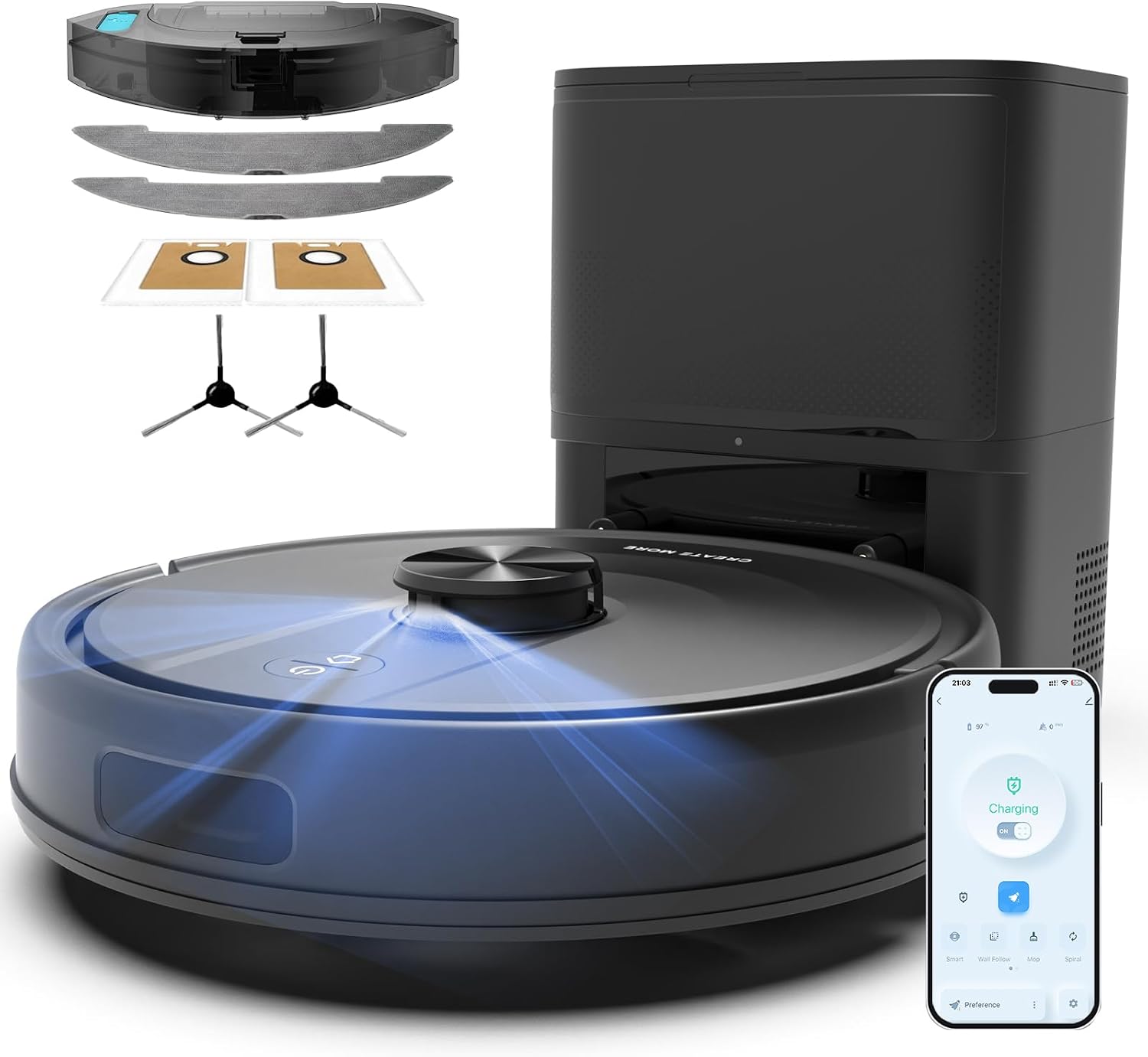
Pros
- Strong 6000Pa suction for deep cleaning carpets and hard floors.
- Advanced LiDAR navigation prevents collisions and maps efficiently.
- Self-emptying base significantly reduces manual maintenance.
- App control with virtual no-go zones for customized cleaning.
Cons
- Moderate customer rating of 3.3 out of 5 based on limited reviews.
- Mopping function may not replace dedicated wet mops for tough stains.
- Best suited for hard floors and low-pile carpets, not high-pile carpets.
The Bagotte M6 is a self-emptying robot vacuum and mop designed for homes with hard floors and low-pile carpets. According to the product listing, it uses LiDAR navigation to scan and map rooms quickly, then cleans along efficient routes without bumping into furniture. Its 6000Pa suction targets embedded dirt, pet hair, and debris, making it a strong candidate for pet owners.
The self-emptying base holds a dust bag that collects debris from the robot, allowing up to 90 days of hands-free operation. The robot itself has a rectangular form factor and measures 11.66 by 11.66 by 2.88 inches, which helps it reach under low furniture. The included app provides control over scheduling, suction levels, and no-go zones.
Build quality appears solid, with a matte black finish and an H13 filter for fine dust. The battery lasts up to 120 minutes, sufficient for average-sized homes. However, the mopping function is best for light maintenance rather than deep scrubbing. Given the limited reviews and moderate rating, potential buyers should weigh the features against the brand's track record.
This robot is ideal for busy households that want automated daily cleaning without frequent emptying. It may not be the best choice for very high-pile carpets or those expecting a premium mopping experience. Overall, the Bagotte M6 offers a compelling set of features at a competitive price point.
360° LiDAR Navigation: Scans rooms to create accurate maps and avoids obstacles, saving time and reducing missed spots.
6000Pa Suction: Lifts deep dirt and pet hair from carpets and bare floors in one pass, so you don’t need to re-clean areas.
Self-Emptying Base: Automatically empties the robot’s dustbin into a bag, providing up to 90 days of hands-free cleaning.
Smart App Control: Schedule cleaning, adjust suction, set no-go zones, and monitor progress from your phone.
4-in-1 Cleaning: Sweeps, vacuums, mops, and self-empties, covering all daily cleaning needs without switching devices.
120-Minute Battery: Runs long enough to clean multiple rooms on a single charge, ideal for larger homes.
Pet Owners: The 6000Pa suction effectively picks up pet hair and dander from hard floors and low-pile carpets. The self-emptying base reduces contact with allergens.
Busy Professionals: Automate daily cleaning with app scheduling and the 90-day hands-free bag. Set it to clean while you are at work.
Apartment Dwellers: The compact 11.66-inch footprint and LiDAR navigation let it clean tight spaces and around furniture without bumping.
Hard Floor Hoseholds: The vacuum and mop combo keeps sealed wood, tile, and laminate floors free of dust and light sticky marks.
Daily Maintanance: Run it every day to keep floors clean with minimal effort. The self-emptying feature means you don’t have to think about emptying for weeks.

Pros
- 70x power-lifting suction devours dirt and dust bunnies on carpets and hard floors effectively
- ClearView LiDAR navigation maximizes coverage and avoids obstacles for efficient, thorough cleans
- Intuitive app and voice control simplify scheduling and zoning for effortless daily use
- Compact build and self-charging dock make it ideal for small spaces and low-maintenance routines
Cons
- Requires manual bin emptying after each use, unlike models with auto-empty docks
- Bristle brushes demand occasional cleaning to maintain peak performance on pet hair
- Vacuum-only design lacks mopping, limiting it for homes needing wet floor cleaning
The iRobot Roomba 105 Vac Robot Vacuum is an entry-level smart cleaner designed for everyday floor maintenance in small to medium homes, focusing on vacuuming carpets, hardwoods, and tiles without mopping.
Its 70x power-lifting suction paired with a multi-surface bristle brush and edge-sweeping brush excels at pulling up pet hair, crumbs, and dust from low-pile rugs or hardwood in apartments, while ClearView LiDAR maps spaces up to 1000 sq ft in 10 minutes for neat row cleaning and stair avoidance.
Weighing lightly for easy repositioning, it features a modern, low-profile design that slides under furniture, with simple app setup on 2.4 GHz WiFi and durable components like replaceable filters every 3-6 months.
Drawbacks include no auto-empty bin, so frequent emptying is needed, and bristle brushes may tangle with long hair more than rubber alternatives in higher-end models.
Buy this if you want affordable, app-controlled vacuuming for daily pet hair or crumb pickup in compact living areas; skip it for large homes needing self-emptying or mopping combos.
70x Power-Lifting Suction: Delivers intense pull on dirt from deep in carpets, making floors feel freshly scrubbed after each run.
ClearView LiDAR Navigation: Scans and maps your home fast for precise paths, avoiding obstacles to ensure no-spot-left-behind cleaning.
Roomba Home App Control: Schedule rooms, set suction levels, or create no-go zones, putting personalized routines at your fingertips for time savings.
Self-Recharge and Resume: Automatically docks to recharge mid-job then continues, providing seamless full-home coverage without babysitting.
Voice and Button Controls: Start cleans hands-free with Alexa, Siri, or Google Assistant, ideal for multitasking households.
In small apartments with hardwood floors and daily crumbs, it spot-cleans kitchens via app while you work, returning to charge unnoticed.
For pet owners on low-pile carpets, the 70x suction grabs hair effectively during scheduled afternoon runs, keeping floors guest-ready.
Busy families in multi-surface homes use voice commands for quick high-traffic area refreshes, like entryways after school drop-offs.
Ideal for first-time robot vacuum users in compact spaces needing simple setup and obstacle-smart navigation without complex maintenance.
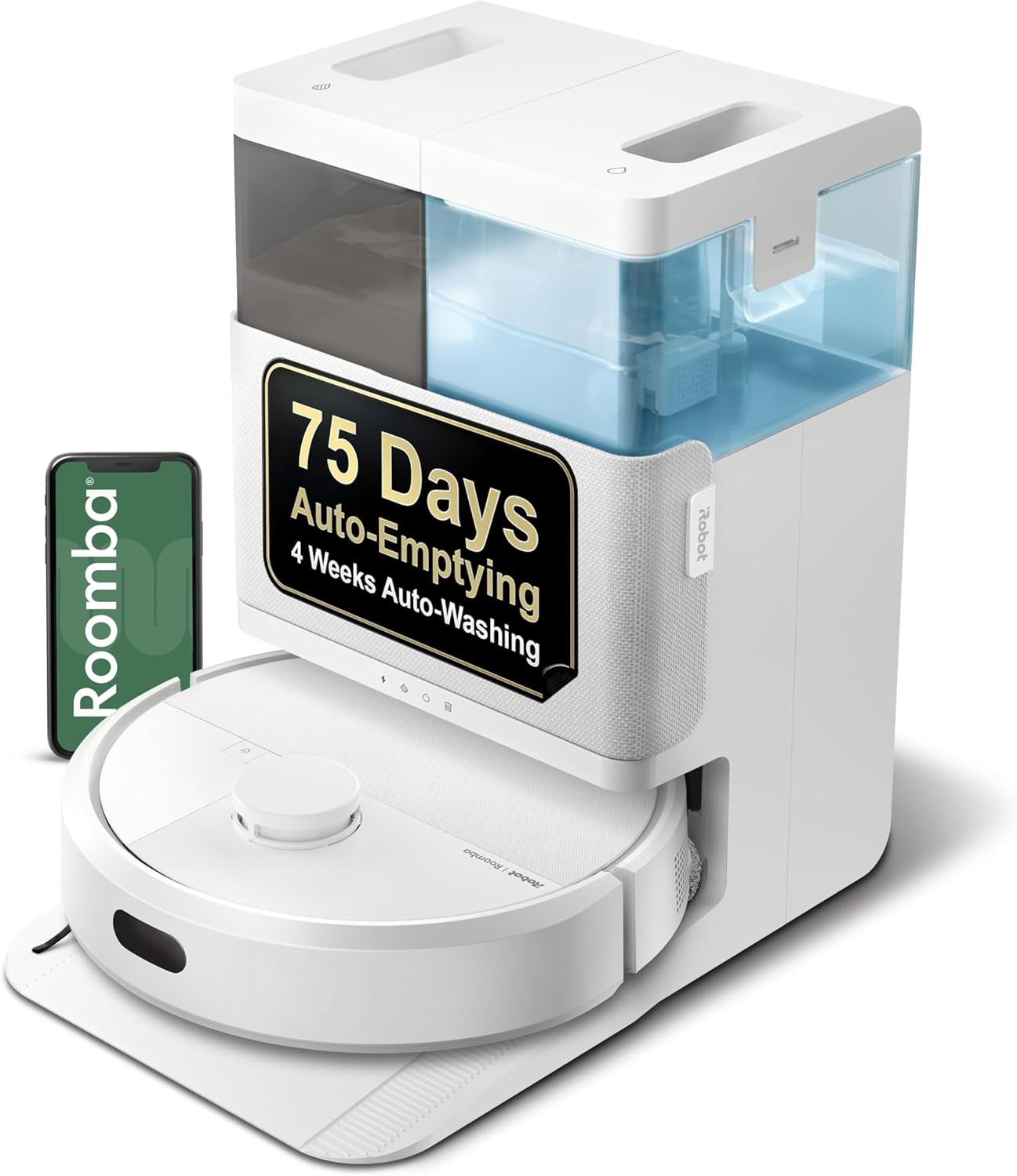
Pros
- Powerful 70x suction combined with edge-sweeping brush and multi-surface rubber brush for effective cleaning on carpets and hard floors.
- AutoWash dock handles emptying, pad washing, and drying for weeks of hands-free operation.
- LiDAR mapping enables room-specific cleaning zones and keep-out areas via the app.
Cons
- Long-term reliability unknown due to no customer reviews yet; price is mid-range but some competitors offer similar features at lower cost.
- AutoWash dock requires occasional bag replacement and cleaning despite self-cleaning cycle.
- Mopping performance may not replace a dedicated manual mop for tough dried-on stains.
The iRobot Roomba Plus 405 (G185) is a 2-in-1 robot vacuum and mop designed for households that want thorough cleaning with minimal effort. It pairs strong suction with spinning mop pads and an advanced AutoWash dock that automatically empties debris, washes and dries the pads, and even cleans itself. This model is ideal for busy families, pet owners, or anyone with a mix of carpets and hard floors who prefers a set-and-forget routine.
In real-world use, the Roomba Plus 405 navigates efficiently using LiDAR: it maps your home in minutes, cleans in straight rows, and avoids obstacles like furniture and stairs. The 70x more suction (compared to the Roomba 600 series) handles pet hair, crumbs, and everyday dirt well on both carpets and bare floors. The spinning mop pads with SmartScrub apply downward pressure to scrub stuck-on messes, making it effective for light to moderate mopping. However, it may struggle with dried-on food or heavy grime without multiple passes.
Build quality is solid, with a low-profile round design that fits under most furniture. The AutoWash dock is a standout feature: it holds up to 75 days of debris in a sealed bag, and it refreshes the mop pads during cleaning so you never drag dirt around. After a cycle, the dock washes and dries the pads, ready for the next use. The self-cleaning function reduces internal buildup, but you will still need to replace the bag and occasionally wipe the charging contacts.
One limitation is the lack of customer reviews at launch, making real-world durability unknown. Additionally, while the mopping is decent, it is not a substitute for a deep manual mop session. The app and voice control work well, and you can set keep-out zones, adjust suction, or schedule cleaning easily.
Who should buy it: Anyone with busy schedules who wants a truly hands-free vacuum and mop combination for daily maintenance on mixed flooring. Avoid if you need industrial-strength mopping or are on a tight budget, as the price is mid-range for this class.
AutoWash Dock: Automatically empties debris for up to 75 days, washes and dries mop pads after each cleaning, and self-cleans to minimize maintenance. Benefit: You handle dirt and wet pads almost never.
Spinning DualClean Mop Pads with SmartScrub: Two rotating pads scrub with 2x deeper pressure than standard mode. Benefit: Removes coffee rings, paw prints, and grime without extra effort.
ClearView LiDAR Navigation: Laser mapping creates a precise floor plan, cleans in efficient rows, and avoids obstacles even in the dark. Benefit: Faster, more thorough coverage with fewer missed spots.
Auto-Lift Mop Pads: Sensors detect carpet and lift the mop pads to prevent wetting. Benefit: Seamless transitions between hard floors and rugs without dripping.
Four Cleaning Modes: Choose vacuum only, mop only, combo, or vacuum first then mop. Benefit: Tailor each cleaning session to your current flooring and mess level.
App and Voice Control: Use the Roomba Home app to set zones, schedules, and cleaning preferences, or ask Alexa, Siri, or Google Assistant to start a cycle. Benefit: Customize cleaning from anywhere with minimal effort.
Homes with mixed flooring: The auto-lift mop pads and multiple cleaning modes make it easy to vacuum carpets and mop hard floors in one pass without manual intervention.
Pet owners: Strong suction and edge-sweeping brush pick up pet hair and dander, while the sealed auto-empty bag traps allergens and keeps them out of the air.
Busy professionals: Schedule daily cleaning via the app and trust the AutoWash dock to handle debris and pad maintenance for weeks. LiDAR mapping ensures coverage even when you are not home.
Light mopping on hard floors: Use the mop-only or combo mode for quick cleaning of spills, footprints, and light stains in kitchens and entryways. For heavy messes, a manual mop may still be needed.
Allergy sufferers: The auto-empty bag contains dust and allergens securely, and the dock's self-cleaning reduces exposure to dirty components.

Pros
- Exceptional 18,500Pa suction power for deep cleaning carpets and pet hair.
- Effective 18mm auto-lift mop protects rugs and transitions seamlessly between surfaces.
- ZeroTangle 2.0 reduces hair tangling, ideal for pet and long hair owners.
- Advanced AIVI 3D obstacle avoidance reliably avoids common household items.
- Fully automated OMNI station with hot water washing and self-emptying reduces manual chores.
Cons
- No reviews yet, so long-term reliability and real-world performance are unconfirmed.
- High suction and smart features may lead to higher power consumption compared to basic models.
- The large OMNI station requires significant floor space for placement.
The ECOVACS DEEBOT T50 MAX PRO Omni is a premium robot vacuum and mop designed for homeowners who demand powerful cleaning on mixed surfaces. With 18,500Pa BLAST suction, it excels at lifting embedded dirt, pet hair, and dust from both carpets and hard floors. The 18mm auto-lift mop automatically raises when it detects carpet, preventing wet rugs and ensuring seamless transitions across tile, hardwood, and carpet.
In real-world use, the ZeroTangle 2.0 brush effectively minimizes hair wrap, making it a strong choice for pet owners or anyone with long hair. The AIVI 3D 3.0 obstacle avoidance uses AI and 3D sensing to navigate around cables, shoes, and toys, reducing the chance of getting stuck. The 10-in-1 OMNI station automates hot water mop washing, hot air drying, self-emptying, and water refilling, offering weeks of hands-free operation.
The robot is relatively compact but the station is bulky, so it requires dedicated floor space. Battery life of 200 minutes covers large homes, and the unit supports app, voice, and remote control. However, with no customer reviews yet, potential buyers should consider its reliability over time. Overall, it's best for pet owners, carpeted homes, and those wanting a fully automated cleaning solution. Those on a tight budget or with very small spaces may find simpler models more suitable.
18,500Pa BLAST Suction: Delivers powerful airflow to lift deep dirt and pet hair from carpets and hard floors, reducing the need for manual vacuuming.
18mm Auto-Lift Mop: The mop automatically lifts when transitioning to carpet, keeping rugs dry and preventing moisture damage while cleaning mixed flooring.
ZeroTangle 2.0: Anti-tangle brush design prevents hair from wrapping around the roller, cutting down on maintenance and making it ideal for pet-friendly homes.
AIVI 3D 3.0 Obstacle Avoidance: AI and 3D sensing help the robot identify and avoid cables, shoes, socks, and toys, reducing interruptions and protecting items.
10-in-1 OMNI Station: Automates mop washing with hot water (167°F), hot air drying (113°F), self-emptying, water refilling, and solution dispensing, providing a truly hands-free experience.
Pet Owners: The 18,500Pa suction and ZeroTangle 2.0 brush handle pet hair on carpets and hard floors without frequent brush cleaning, while the auto-lift mop keeps pet beds and rugs dry.
Multi-Floor Homes: Seamlessly transitions between carpet, hardwood, and tile, automatically lifting the mop on carpets and adjusting suction for each surface.
Busy Families: The 200-minute battery and OMNI station automate cleaning for weeks, so you can maintain a clean home with minimal effort.
Tech Enthusiasts: App control, voice compatibility with Alexa and Google Assistant, and advanced obstacle avoidance make it a smart addition to a connected home.
Allergy Sufferers: Powerful suction and self-emptying reduce dust exposure, while hot water mop washing kills bacteria and removes allergens from floors.
What to Look for in a Repair Guide
Step by Step Instructions
The best guides break down each repair into clear, sequential steps. They should start with the simplest checks, like verifying the power outlet and charging cable, before moving to more advanced diagnostics such as testing the battery voltage or inspecting the main circuit board.
Troubleshooting Flowcharts
A visual flowchart helps you quickly narrow down the problem. For example, if the vacuum shows no signs of life, the flowchart might direct you to check the charging contacts first. If the vacuum powers on but won’t move, it leads you to examine the wheel motors or sensors.
Parts Identification and Diagrams
Knowing what each part looks like and where it is located is critical for successful repairs. Guides with labeled diagrams make it easy to identify the battery pack, main board, IR sensors, and drive motors. This is especially helpful for beginners who are not familiar with the internal layout of robot vacuums.
The Guide That Addresses This Problem
The Robot Vacuum Cleaner Repairing Guide by Evon Dickeson is a resource specifically designed to help you fix a robot vacuum that won’t turn on. It covers various parts of your robot, from the power system to the drive mechanism. The description states: “Even if the new-age robot vacuum cleaners are the future of housekeeping, these tiny little moving pets are still subject to get maintenance checks. You can simply follow these steps to know how to fix the robot cleaner at home.” This guide is priced at $8.99 – $499.99 and has a rating of 3.3 out of 5 from 3 reviews. For those considering a new robot vacuum for tile floors, see our cheapest robot vacuum for tile floors article.
Why Won’t My Robot Vacuum Turn On Even After Charging?
If your robot vacuum has been charging for several hours but still won’t turn on, the battery may be completely dead or the charging circuit may have failed. Try a different charging cable and dock if possible. If the vacuum still shows no signs of life, you may need to replace the battery or check the main fuse.
How Do I Test the Battery on My Robot Vacuum?
You can test the battery using a multimeter. Set it to DC voltage and touch the probes to the battery terminals. A fully charged lithium-ion battery should read around 3.7 to 4.2 volts per cell. If the voltage is significantly lower, the battery likely needs replacement. Always follow safety precautions when handling batteries.
What Tools Do I Need to Repair a Robot Vacuum?
Basic tools include a small Phillips head screwdriver, a plastic spudger for opening the casing, a multimeter for electrical testing, and replacement parts such as a new battery or charging board. The Robot Vacuum Cleaner Repairing Guide likely lists the specific tools required for each repair step.
Repairing your robot vacuum yourself can save money and extend the life of your device. If you decide that a new machine is a better option, our best robot vacuum for kitchen guide can help you choose a reliable model for your home.
Where These Fall Short
Sealed HEPA filtration is not listed on any of these, which may not suit a household that wants it specifically.
A 6.2 lb body is easy to carry, though it may not suit thick carpet as well as a heavier machine.
Spending $499.99 makes sense for daily use, less so for a small flat that needs a quick pass once a week.
Related reading: Blog.
Pros and Cons at a Glance
ECOVACS DEEBOT T50 MAX PRO Omni Robot Vacuum and Mop, 18,500Pa Suction, 18mm Auto-Lift, Ze
Pros
- Obstacle avoidance, useful in cluttered rooms
- Listed for both carpet and hard floors
Cons
- Runs on battery, so runtime limits one session
- No self-emptying base, so the bin needs emptying by hand
- No HEPA filter listed in the specifications
iRobot Roomba 105 Vac Robot Vacuum – Easy to use, Intense Power-Lifting Suction, LiDAR Nav
Pros
- Bagless bin, so there are no replacement bags to buy
- LiDAR navigation for systematic room mapping
- Listed for both carpet and hard floors
- Light at 6.2 lb, easy to carry up stairs
Cons
- Runs on battery, so runtime limits one session
- No self-emptying base, so the bin needs emptying by hand
- No HEPA filter listed in the specifications
iRobot Roomba Plus 405 (G185) Combo Robot Vacuum & Mop with AutoWash Dock – Spinning Mop P
Pros
- LiDAR navigation for systematic room mapping
- App control for scheduling and settings
- Listed for both carpet and hard floors
Cons
- Runs on battery, so runtime limits one session
- No self-emptying base, so the bin needs emptying by hand
- No HEPA filter listed in the specifications
Points above come from manufacturer specifications and Amazon rating data for each model, recorded when this guide was last updated.


Write Your Review
No reviews yet. Be the first to share your experience!